 |
| User handbook |
1. Roles
| Role | Definition |
| Operator | Operators are registered users of OPERATE who plan, initiate and control the individual assessments for their institutions (research centres or central agencies) |
| Panellist | Panellists are the participants in the assessments (researchers and other experts) |
| Instructor | Instructors are users who determine the use of OPERATE and validate Operators |
2. Assessment process
| Preparation via OPERATE |

|
Self assessment |
|
Group assessment |
|
|
|
||
3. Assessment administration
The “assessment administration” is accessible via the dashboard. The Operator has access to all assessments he/she sets up. Assessments can be reviewed under “My results”.
3.1 Set up an assessment
A new assessment can be set up under “Assessment administration” using the -button. In order to set up an assessment, the Operator needs to decide on specific framework conditions to enable the Panellists to use the same frame of reference and thus assess the same subject. The following points must be defined:
- Subject of assessment (research field or project cooperation)
- Research field according to the UNESCO nomenclature for fields of science and technology
- Observed target country of the assessment
- Time horizon of the assessment
- Technology readiness level
In addition, the Operator can include a short description of the subject of assessment to give additional important information for the assessment panel.
Subject of assessment (research field or project cooperation)
Defining a research field or project cooperation (= subject of assessment) as precisely as possible enables a uniform frame of reference for the assessment panel. Furthermore, the more concretely a research field/project can be narrowed down, the more specific and thus easier it is to gather background information on the topic/project and discuss with the Panellists.
The Operator defines the subject of assessment. In addition, the research field has to be assigned to the according standardised UNESCO nomenclature of fields of science and technology in order to ensure comparability between different assessments.
Observed target country of the assessment
Every international cooperation with a scientific partner needs to consider the context of the partner’s home country: form of governance, political situation, geopolitical context, regulations, ethics etc.
Hence, the target country of the assessment needs to be defined.
Time horizon for the assessment
To ensure that all Panellists use the same frame of reference, an identical time horizon has to be considered. Depending on the subject of assessment, the following division can be made:
- short-term observation (approx. next 4 years; roughly the duration of a research project)
- medium-term observation (approx. next 8 years; roughly the duration of a programme cooperation)
- long-term observation (perspective above 8 years; in case of an open cooperation agreement)
Technology readiness level
Research can be basic or applied in nature, a distinction determined as technology maturity. Technology maturity can play a relevant role in the planned assessment, depending on whether the collaboration is classified as basic, experimental or applied. In this case, the technology readiness level for the assessment has to be defined.
- TRL 1-3: Basic Research
- TRL 4-6: Experimental Research
- TRL 7-9: Applied Research
In the case of an assessment with topics that cannot be defined by the TRL, the classification should nevertheless be made in the three categories that are also intended to describe the fundamental closeness to application.
4. Panellists administration
The Operator can assign Panellists to a specific assessment. The Panellists administration can only be accessed after setting up the assessment via going to the “Assessment administration”, selecting the respective assessment and clicking on the button .
4.1 Add Panellists
A new Panellist can be added using the button “Add new panellist”.
Existing Panellists can be blocked via selecting the status enabled/blocked (in case he/she shall no longer participate in the assessment nor receive any automated mails from the OPERATE application), or edited.
The Operator needs to enter basic information about each Panellist, including name, e-mail, department type, organisation type, country of the affiliated organisation and name of the organisation (not mandatory).
The assessment panel should be composed according to the subject of the assessment and the objective of the assessment. The selection of Panellists is decided by the Operator (usually together with the leading scientist of the assessment). It can be a purely technical panel as well as a mixed team of technical scientists and scientists with country or regional expertise as well as administrative staff (e.g. international-, legal, export control department). This may allow for different perspectives and contribute to a balanced assessment.
The number of participants is not prescribed; however, a panel size of 7-10 Panellists is recommended.
4.2 Invite Panellists to an assessment
Once all Panellists are added by the Operator to the specific assessment, an automated invitation – including access link to the OPERATE questionnaire – can be sent to all Panellists using the button .
Panellists can also be invited individually by selecting the “pending/sent”-button next to each single Panellist’s name.
5. Self assessment
Access to the online assessment is provided by the Operator via the OPERATE application. Panellists receive an automated message with access information and are invited to start the self-assessment. The Operator can set a deadline if wanted – a timespan of minimum 1 week is recommended. This has to be communicated outside of the OPERATE application. During the self assessment, the Operator should be available for possible questions.
Questionnaire: Risk and opportunity question sets
The basis of the OPERATE application is a catalogue of questions regarding the likelihood of the occurrence of damage and the severance of damage if a potential risk becomes reality. The risk questions are mirrored with a set of opportunity questions, assessing the likelihood of the occurrence and the expected beneficial consequences if a potential opportunity becomes reality.
In total, OPERATE offers 10 question sets for risk and 10 question sets for opportunities (= likelihood and consequence).
The Operator can view the incoming results in real time under “show results”. In addition, the Operator can check in real time when each Panellist has accessed the questionnaire (“opt-in date”) and how many questions have already been answered by each Panellist (“questions answered”).
Once all Panellists have answered the assessment questions, the Operator scans the accumulated results via “show results”. Questions rendering great deviations or show particularly high risks/opportunities can be selected for an in-depth discussion during the group assessment using the selections box “select this question set for group assessment” next to each question. The selection needs to be saved once.
6. Group assessment
The group assessment can take place in the form of a virtual or in person (recommended) workshop. The Operator schedules a date for the group assessment. This has to be communicated outside of the OPERATE application.
To start the group assessment, a new automated link has to be sent via the OPERATE application using the button . When accessing this link, Panellists will be shown only the pre-selected questions indicating their choices made during the self assessment.
During the workshop, the accumulated results of the online self assessment are presented. The questions with major deviations or particularly high risks/opportunities, pre-selected by the Operator, should be discussed: Why do deviations occur and can a common assessment be found in the discussion? The arguments, especially in cases where no agreement can be reached, should be documented by the Operator. The moderation and detailed procedure of the group assessment are the responsibility of the Operator.
If an agreement can be reached, the Panellists can adjust their individual assessments and submit reassessments in the OPERATE application via the invitation link that has been sent prior to the group assessment.
The workshop concludes with the finalization of the assessment and the generation of the risk/opportunity-matrix.
7. Results
The results can be extracted by the Operator via the “print page”-function, using the right mouse button.
The results of the self-/group-assessment are presented in the risk/opportunity-matrix. Risks are shown in blue; Opportunities are shown in orange.
The x-axis and y-axis (bottom and left side of the matrix) show the scales for the likelihood and consequence of a risk occurring; The x-axis and y-axis (top and right side of the matrix) show the scales for the likelihood and consequence of an opportunity occurring.
The dots are numbered, representing the number of the corresponding question (1-8 = questions related to risks, in orange; 9-16 = questions related to opportunities, in blue).
Interpretation of individual dots, examples:
- If an orange dot with the number 1 is shown in the lower/left quadrant of the matrix, this means that the risk associated with "uncontrolled access leading to unwanted transfer of knowledge" (questions 1) has been rated as very likely to occur (scale value = 5) and, if it occurs, as very critical (scale value = 5).
- If a blue dot with the number 9 is shown in the upper/right quadrant of the matrix, this means that the opportunity associated with "Access to additional knowledge" (questions 9) has been rated as very likely to occur (scale value = 5) and, once it occurs, as very beneficial (scale value = 5).
- If a blue dot with the number 13 is shown in the middle quadrant of the matrix, this means that the opportunity associated with "Enhancement of technological/scientific sovereignty" (questions 13) has been rated as possible to occur (scale value = 3) and, once it occurs, as moderate (scale value = 3).
The risk/opportunity-matrix must be interpreted by the Operator on a case-by-case basis. An interpretation guide is provided below to assist in making sense of the results:
| Risk/opportunity-matrix | Possible interpretation |
|
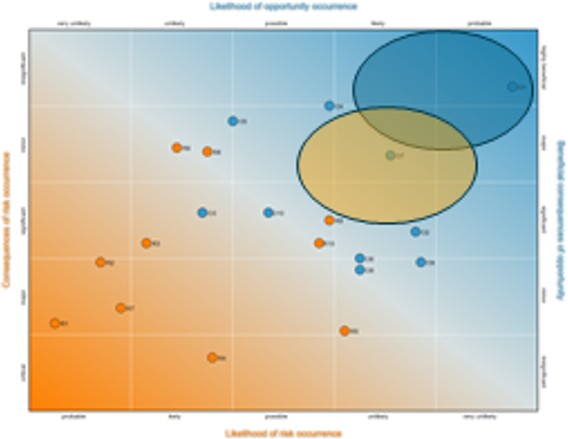 |
Opportunities: high-high Risks: low-low Good project conditions. The opportunities are very likely and have strong effects, the risks are unlikely with relatively little consequences. |
|
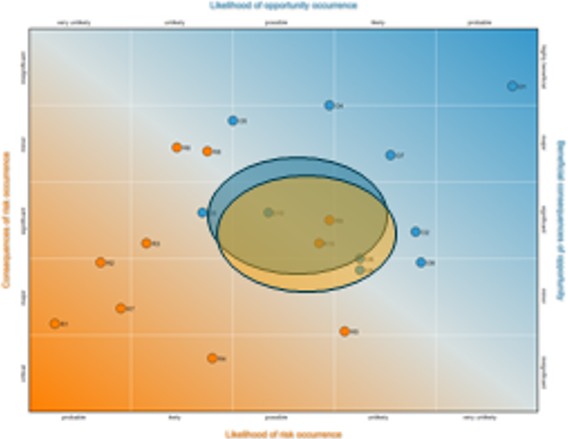 |
Opportunities: medium-medium Risks: medium-medium Fine project conditions. The opportunities are interesting with good effects, the risks are possible with calculable consequences. |
|
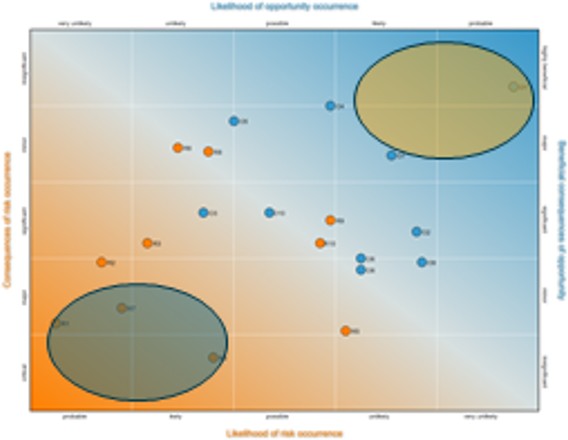 |
Opportunities: low-low Risks: low-low Bad, but uninteresting project conditions. The opportunities are very unlikely and have almost no effects, the risks are unlikely too without consequences. |
|
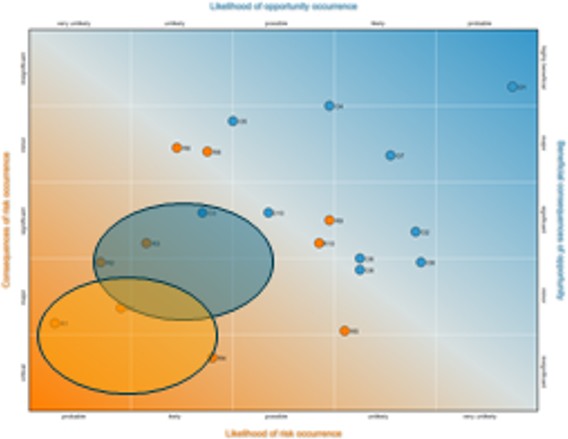 |
Opportunities: low-low Risks: high-high Is it worth it? The opportunities are very weak with serious risks simultaneously. |
8. Finalizing the assessment
Once all results are retrieved and saved, the Operator can close the assessment via the button .
Once the assessment is closed, all personal data from the Panellist will be automatically deleted. The anonymized results will still be accessible for the Operator via "my results".
9. OPERATE questionnaire system
The OPERATE questionnaire contains a selection of 8 questions related to risks and 8 questions related to opportunities (each divided into a set of two sub-questions, one on the likelihood of occurrence and one on the consequence). These questions have been developed over the course of more than two years, guided by recent policy developments and based on relevant literature as well as extensive feedback from stakeholders. The questionnaire thus represents a holistic approach to the risk-opportunity assessment of international research cooperation.

|
About DLR Projektträger Data Protection Policy Imprint |

|